<!DOCTYPE html>
<html>
<head>
</head>
<body>
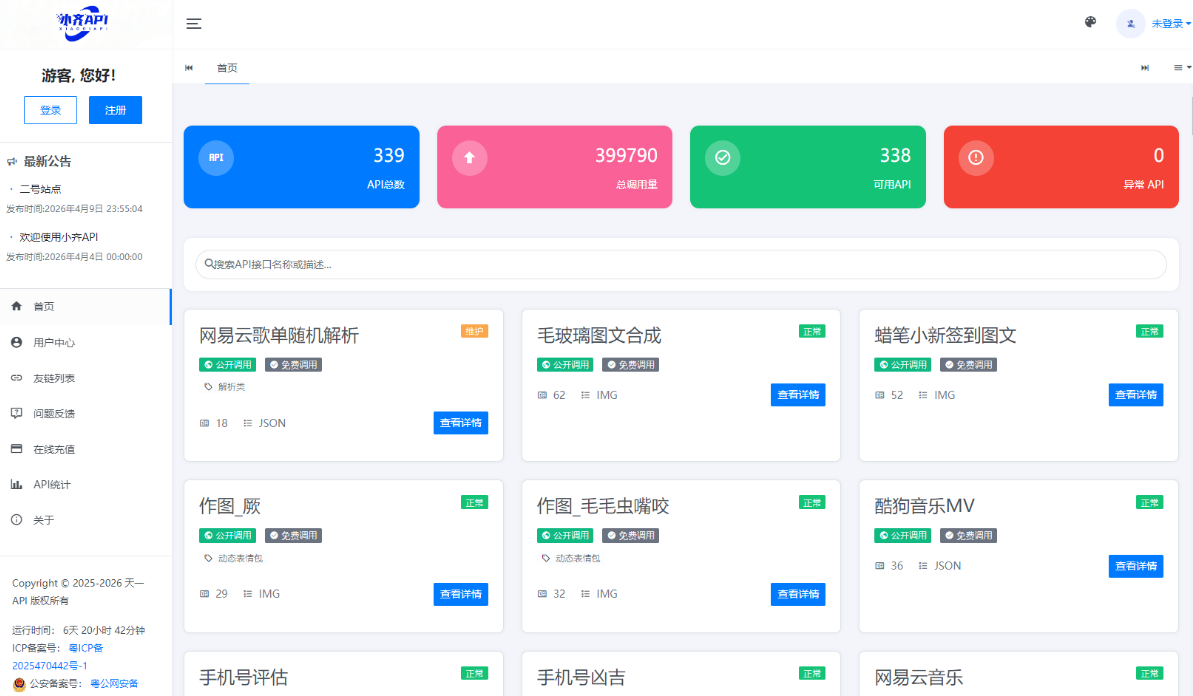
<p style="margin: 0px; padding: 0px; -webkit-tap-highlight-color: rgba(0, 0, 0, 0); color: #000000; font-family: 'Microsoft Yahei', 微软雅黑; font-size: 16px; font-style: normal; font-variant-ligatures: normal; font-variant-caps: normal; font-weight: 400; letter-spacing: normal; orphans: 2; text-align: start; text-indent: 0px; text-transform: none; widows: 2; word-spacing: 0px; -webkit-text-stroke-width: 0px; white-space: normal; background-color: #ffffff; text-decoration-thickness: initial; text-decoration-style: initial; text-decoration-color: initial;">API管理系统源码 API计费系统 最新小齐二开版<br /><br />测试环境:Nginx+PHP7.4+MySQL5.7<br /><br />安装教程:访问域名进行安装<br /><br />二开日志:<br /><br />1. 首页新增文字广告位<br />2. 优化后台友链列表加载速度<br />3. 新增API技术支持提示(无apikey就会提示)<br />4. 首页新增API统计<br />5. 增加QPS限制(普通会员apikey和无apikey限制可修改)<br />6. 超级会员点数不限<br />7. 余额/点数不足预警<br />8. 友链申请审核发送管理员邮箱(通过发送用户)<br />9. 意见反馈回复发送用户邮箱<br />10. 普通会员有点数接口可设置每日限制点数<br /><img id="d41d8cd98f00b204e9800998ecf8427e_img_118745" style="vertical-align: middle; display: inline-block; max-width: 100%; height: 381px; border-image: initial; border: medium none currentcolor;" title="1777125305441766.png" src="https://img.dkewl.com/202604/a1d4e5f156.png" alt="1.png" width="577" /></p>
<p style="margin: 0px; padding: 0px; -webkit-tap-highlight-color: rgba(0, 0, 0, 0); color: #000000; font-family: 'Microsoft Yahei', 微软雅黑; font-size: 16px; font-style: normal; font-variant-ligatures: normal; font-variant-caps: normal; font-weight: 400; letter-spacing: normal; orphans: 2; text-align: start; text-indent: 0px; text-transform: none; widows: 2; word-spacing: 0px; -webkit-text-stroke-width: 0px; white-space: normal; background-color: #ffffff; text-decoration-thickness: initial; text-decoration-style: initial; text-decoration-color: initial;"> </p>
<p style="margin: 0px; padding: 0px; -webkit-tap-highlight-color: rgba(0, 0, 0, 0); color: #000000; font-family: 'Microsoft Yahei', 微软雅黑; font-size: 16px; font-style: normal; font-variant-ligatures: normal; font-variant-caps: normal; font-weight: 400; letter-spacing: normal; orphans: 2; text-align: start; text-indent: 0px; text-transform: none; widows: 2; word-spacing: 0px; -webkit-text-stroke-width: 0px; white-space: normal; background-color: #ffffff; text-decoration-thickness: initial; text-decoration-style: initial; text-decoration-color: initial;"><img id="d41d8cd98f00b204e9800998ecf8427e_img_118746" style="vertical-align: middle; display: inline-block; max-width: 100%; height: 447px; border-image: initial; border: medium none currentcolor;" title="1777125310607057.png" src="https://img.dkewl.com/202604/a1d4e5f600.png" alt="2.png" width="569" /></p>
</body>
</html>
📦 配套资源下载
加载中...

全部评论(549)